How to make a mind map for studying
A mind map puts one topic in the middle and everything you need to know around it, so a whole chapter fits on one screen. Building it makes you decide what matters, and that is most of the revision already done.
Open this example Start from a blank map
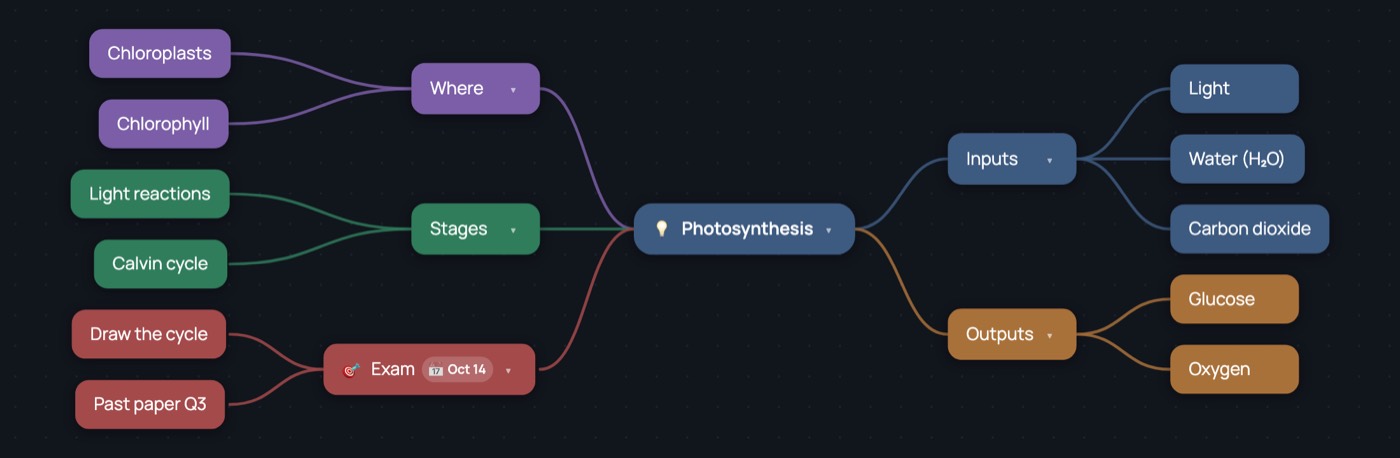
Step by step
- Put the topic in the centre. One word or a short phrase: “Photosynthesis”, “The French Revolution”, “Chapter 4”.
- Add the big questions as branches. What goes in, what comes out, where, how, why it matters. Press Tab for each one. Five to seven is plenty.
- Fill each branch with key words, not sentences. Select a branch, Tab for a detail, Enter for the next one on the same level. If it takes a full sentence, it probably belongs in a note on the bubble.
- Close the book and fill the gaps. Try to add what is missing from memory, then check. The empty spots are what to revise next.
- Add the deadline. Put the exam or hand-in date on a branch. Tools › Due dates lists every date across the map, in order.
- Revise from the map. Fold branches with Space and try to say what is inside before opening them again.
Why it works
- You have to choose the key words yourself, which is harder — and stickier — than re-reading or highlighting.
- The links between ideas are drawn, not implied, so it is easier to see how one part leads to another.
- Colours and position give each branch its own place, which helps you recall it later.
Make it yours
- Pick a light theme and export a PDF to print it, or a PNG to put on your phone.
- Try the Outline layout to read the same map as a list the night before.
- Sign in and the same maps are on your computer and your phone.
About Dendra · Manual · Terms · Privacy